
A VS Code extension with two handcrafted dark themes — rich, deep colors precisely cut like a gem.
Inspired by Obsidian's default dark palette. Warm purples, soft blues and greens on a deep dark background — like looking at gemstones under a jeweler's loupe.
A deep-sea dark theme. Cool ice blues and bioluminescent greens contrasted with warm coral reds and amber — like precious stones discovered on the ocean floor.
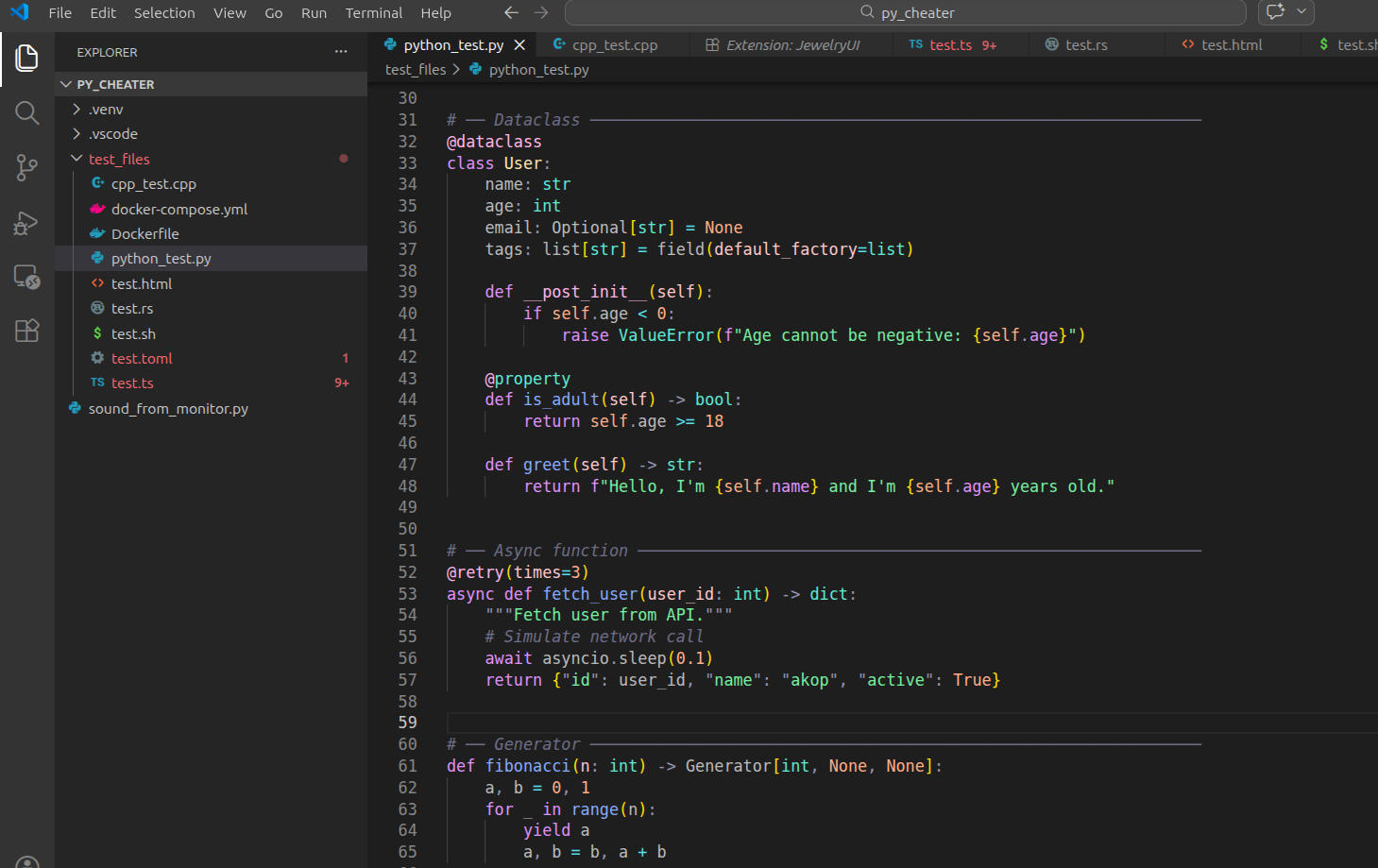
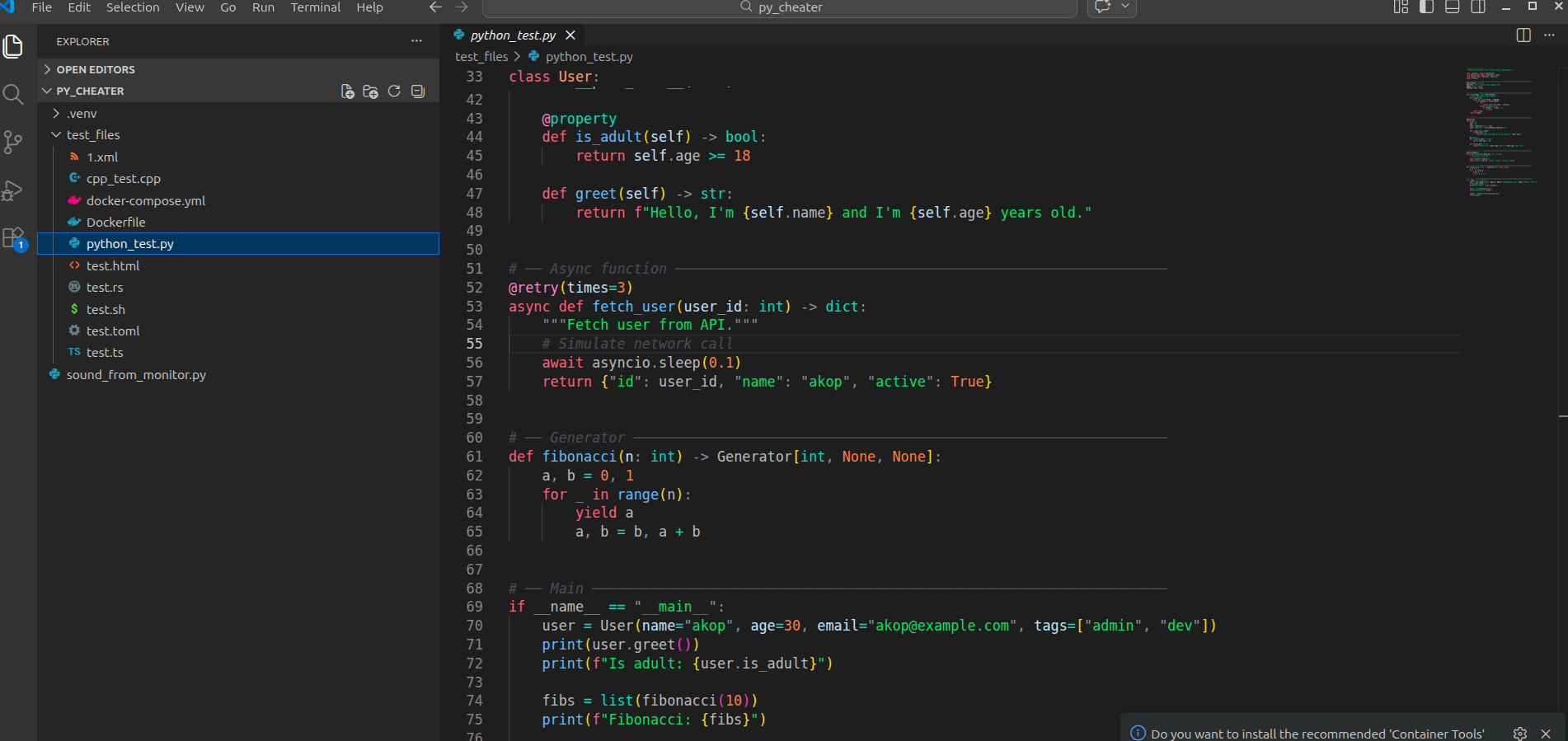
| Token | Color | Preview |
|---|---|---|
| Keywords / storage | #cba6f7 |
🟣 Mauve |
| Functions / methods | #89b4fa |
🔵 Blue |
| Strings | #a6e3a1 |
🟢 Green |
| Classes / structs | #f9e2af |
🟡 Yellow |
| Type annotations | #94e2d5 |
🩵 Teal |
| Interfaces | #74c7ec |
🩵 Sky |
| Numbers / booleans | #fab387 |
🟠 Peach |
| Properties | #89dceb |
🩵 Cyan |
| Parameters | #f2cdcd |
🌸 Flamingo |
this / self |
#f38ba8 |
🔴 Red |
| Decorators / macros | #f5c2e7 |
🩷 Pink |
| Comments | #6c7086 |
⬜ Overlay |
| Errors | #f38ba8 |
🔴 Red |
| Token | Color | Preview |
|---|---|---|
| Keywords / storage | #ff7b72 |
🔴 Coral |
| Functions / methods | #79c0ff |
🔵 Ice Blue |
| Strings | #56d364 |
🟢 Bio Green |
| Classes / structs | #ffa657 |
🟠 Amber |
| Type annotations | #39d4c5 |
🩵 Teal |
| Interfaces | #79c0ff |
🔵 Ice Blue |
| Numbers / booleans | #f0883e |
🟠 Orange |
| Properties | #39d4c5 |
🩵 Teal |
| Parameters | #cae8ff |
🩵 Pale Blue |
this / self |
#ff9bce |
🩷 Pink |
| Decorators / macros | #ff9bce |
🩷 Pink |
| Comments | #8b949e |
⬜ Light Grey |
| Errors | #ff7b72 |
🔴 Coral |
| Language | Highlights |
|---|---|
| Python | Decorators, f-strings, dataclasses, dunder methods |
| TypeScript | Interfaces, generics, enums, decorators |
| JavaScript | Template literals, destructuring, async/await |
| Java | Annotations, generics, package declarations |
| C | Preprocessor directives, pointers, macros |
| C++ | Templates, namespaces, smart pointers, lambdas |
| Rust | Lifetimes, traits, macros, enums, pattern matching |
| HTML | Tags, attributes, JSX/TSX components |
| CSS | Selectors, variables, at-rules, pseudo-classes |
| XML | Tags, attributes, namespaces, CDATA, entity refs |
| YAML | Keys, anchors, aliases, scalars |
| TOML | Tables, keys, datetimes, inline tables |
| Bash | Variables, heredocs, flags, built-ins |
| Dockerfile | Instructions, ARG/ENV, multi-stage builds |
| Docker Compose | Services, volumes, networks, anchors |
| Gherkin | Keywords, tags, data tables, docstrings, parameters |
| INI | Section headers, keys, values, numbers, booleans, comments |
Both themes provide full XML tokenization including:
- Tag names and punctuation (
<,>,</,/>) - Attribute names and values
- Namespace prefixes and URIs (
xmlns:xsi,xsi:schemaLocation) - Entity references (
&,<,>) - CDATA blocks (
<![CDATA[ ... ]]>) - DOCTYPE declarations
- Processing instructions (
<?xml ... ?>)
| Token | Jewelry | Ocean Jewelry |
|---|---|---|
| Tag names | #f38ba8 🔴 |
#ff7b72 🔴 |
Tag punctuation (< > />) |
#9399b2 ⬜ |
#39d4c5 🩵 |
| Attribute names | #89b4fa 🔵 |
#79c0ff 🔵 |
| Attribute values | #a6e3a1 🟢 |
#56d364 🟢 |
| Namespace prefix | #f9e2af 🟡 |
#ffa657 🟠 |
| Entity references | #fab387 🟠 |
#f0883e 🟠 |
| CDATA blocks | #6c7086 ⬜ |
#39d4c5 🩵 |
| Processing instructions | #f5c2e7 🩷 |
#ff9bce 🩷 |
Both themes support .feature files with full Gherkin tokenization:
| Token | Jewelry | Ocean Jewelry |
|---|---|---|
| Keywords (Feature, Scenario…) | #cba6f7 🟣 bold |
#ff7b72 🔴 bold |
| Scenario / feature title | #f9e2af 🟡 |
#ffa657 🟠 |
| Step text | #cdd6f4 ⬜ |
#cae8ff 🩵 |
Parameters (<value>) |
#f2cdcd 🌸 |
#cae8ff 🩵 |
Tags (@tag) |
#f5c2e7 🩷 |
#ff9bce 🩷 |
Data table pipe (|) |
#9399b2 ⬜ |
#8b949e ⬜ |
| Data table cell | #a6e3a1 🟢 |
#56d364 🟢 |
| Docstrings | #a6e3a1 🟢 |
#56d364 🟢 |
| Examples keyword | #89b4fa 🔵 bold |
#79c0ff 🔵 bold |
| Comments | #6c7086 ⬜ italic |
#8b949e ⬜ italic |
Requires the Cucumber (Gherkin) Full Support or Gherkin VS Code extension for syntax tokenization.
Both themes include a full integrated terminal palette — works on Windows, Linux and macOS.
| Color | Normal | Bright |
|---|---|---|
| Black | #45475a |
#585b70 |
| Red | #f38ba8 |
#f38ba8 |
| Green | #a6e3a1 |
#a6e3a1 |
| Yellow | #f9e2af |
#f9e2af |
| Blue | #89b4fa |
#89b4fa |
| Magenta | #cba6f7 |
#cba6f7 |
| Cyan | #94e2d5 |
#94e2d5 |
| White | #bac2de |
#cdd6f4 |
- Background:
#1e1e2e· Foreground:#cdd6f4· Cursor:#f5c2e7
| Color | Normal | Bright |
|---|---|---|
| Black | #21262d |
#484f58 |
| Red | #ff7b72 |
#ff7b72 |
| Green | #56d364 |
#56d364 |
| Yellow | #ffa657 |
#f0883e |
| Blue | #79c0ff |
#79c0ff |
| Magenta | #ff9bce |
#ff9bce |
| Cyan | #39d4c5 |
#39d4c5 |
| White | #cae8ff |
#ffffff |
- Background:
#0d1117· Foreground:#cae8ff· Cursor:#ff9bce
Both themes support .ini / .cfg / .conf files:
| Token | Jewelry | Ocean Jewelry |
|---|---|---|
[section] header |
#f9e2af 🟡 bold |
#ffa657 🟠 bold |
| Key name | #89b4fa 🔵 |
#79c0ff 🔵 |
| String value | #a6e3a1 🟢 |
#56d364 🟢 |
Comment (# ;) |
#6c7086 ⬜ italic |
#8b949e ⬜ italic |
Numbers and booleans use the global theme colors.
Both themes ship with sensible editor defaults:
- Tree indent: 20px with always-visible guides
- Tab height: compact
- Auto save: after 5s delay
- Mouse wheel zoom: enabled
- Bracket pair colorization: independent per bracket type
- TypeScript / JavaScript auto-imports and suggestions: enabled
- Comments font style: normal (not italic)
These are defaults only — your own
settings.jsonvalues always take priority.
JewelryUI provides syntax coloring on top of VS Code's language tokenizers. For the best experience, make sure you have the relevant language extensions installed:
Python, Java, C, C++, Rust, TOML, XML, YAML, Docker, Docker Compose and Gherkin require a language extension to be installed in VS Code for syntax tokenization to work.
JavaScript, TypeScript, HTML, CSS, Bash and JSON are supported out of the box by VS Code — no extra extension needed.
Search JewelryUI in the VS Code Extensions panel, or:
code --install-extension Akop4.jewelryuiThen Ctrl+Shift+P → Preferences: Color Theme → choose Jewelry or Ocean Jewelry.
Found a color that looks off? Open an issue at github.com/Akopov4/jewerly_ui/issues and include:
- The language / file type
- The token name (use Developer: Inspect Editor Tokens and Scopes)
- A screenshot if possible
MIT © 2026 Akop4