
Know Your Resume Score in Seconds



Upload your resume PDF. Get an AI-powered score across 10 weighted parameters, brutally honest recruiter feedback, missing ATS keywords, and rewritten sections — all in under 15 seconds, at zero cost.
🚀 Live Demo · 📖 API Docs · 🐛 Report a Bug · 💡 Request Feature
- Overview
- The Problem We're Solving
- Key Features
- Tech Stack
- System Architecture
- AI Scoring System
- API Reference
- Database Schema
- Project Structure
- Getting Started
- Environment Variables
- Deployment
- Team — Group 37
- RACI Matrix
- Roadmap
- Privacy & Data Handling
- Contributing
- License
CVDekho is a full-stack, AI-powered web application built under the HIT AI Systems & Industry Readiness Programme 2026 by Group 37 (10 members). It enables students and early-career professionals to get honest, recruiter-grade resume feedback in seconds — for free.
The system accepts a PDF resume, extracts its text using PyMuPDF, passes it through a carefully engineered 10-parameter Gemini 2.5 Flash prompt, and returns a structured evaluation complete with a weighted score (0–100), critical issues, missing ATS keywords, and AI-rewritten sections.
| Metric | Value |
|---|---|
| Scoring Parameters | 10 weighted |
| Response Time | ~10–15 seconds |
| Max PDF Size | 5 MB |
| Infrastructure Cost | ₹0 (all free tiers) |
| AI Model | Google Gemini 2.5 Flash |
| Team Size | 10 members |

CVDekho landing page — 2,400+ job seekers scored, 91% avg. ATS pass rate
75% of resumes are rejected by Applicant Tracking Systems (ATS) before a human recruiter ever reads them.
Students and freshers applying for jobs face three compounding problems: they don't know what recruiters look for, they can't afford paid resume tools, and they receive zero feedback after rejection. Existing tools are either paywalled, template-only, or produce generic advice that doesn't help.
CVDekho provides specific, parameter-level, AI-powered feedback — the kind of honest critique a senior recruiter would give — completely free.
- 10-parameter AI scoring — each parameter weighted by actual recruiter priorities, producing an overall score from 0 to 100 with a grade (A through F)
- ATS keyword gap analysis — identifies up to 6 missing keywords for your target role
- AI-rewritten sections — Gemini rewrites your weakest professional summary and worst bullet point, showing you exactly how they should read
- Top 3 critical issues — the most urgent, actionable fixes called out clearly
- Honest, calibrated scoring — intentionally uncalibrated to avoid score inflation; most student resumes score 35–55
- Fast pipeline — PDF upload to full JSON result in under 15 seconds
- Privacy-first storage — PDFs stored in a private Supabase bucket; no public access, no human review
- Fully free — deployed on free-tier infrastructure with no credit card required
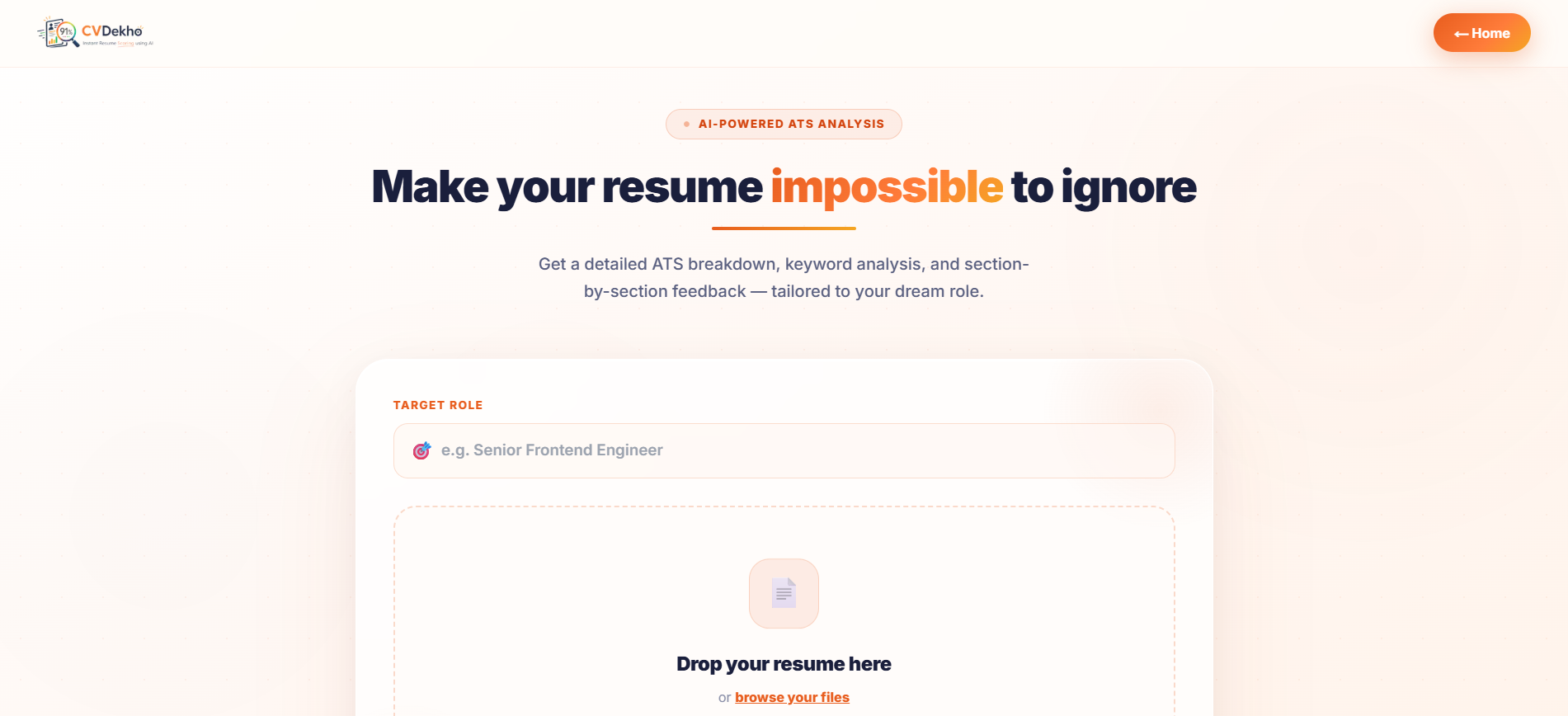
Upload page — upload your PDF and enter a target role for role-specific ATS keyword matching
| Technology | Version | Purpose |
|---|---|---|
| Next.js | 14 | App Router, server components, file-based routing |
| TypeScript | — | Type-safe API integration across all components |
| Tailwind CSS | — | Responsive UI, score gauge, status badges |
| Clerk | — | Authentication — sign-in, session management, route protection |
| Vercel | — | Hosting — instant GitHub deploys, edge CDN, free tier |
| Technology | Version | Purpose |
|---|---|---|
| Python | 3.12 | Core backend language |
| FastAPI | 0.135.3 | Async REST API, Pydantic validation, auto Swagger docs |
| Uvicorn | 0.44.0 | ASGI server for concurrent PDF upload requests |
| PyMuPDF (fitz) | 1.27.2.2 | PDF text extraction — handles complex layouts |
| google-generativeai | 0.8.6 | Official Gemini SDK |
| supabase | 2.28.3 | Python client for DB inserts and storage uploads |
| python-multipart | 0.0.24 | multipart/form-data file upload support |
| python-dotenv | 1.2.2 | Environment variable management |
| Technology | Config | Notes |
|---|---|---|
| Google Gemini 2.5 Flash | temperature=0.1, top_p=0.8, max_tokens=4096 | Free tier: 15 req/min, 1500/day |
| Prompt Engineering | 10-parameter structured schema | Senior recruiter persona, strict JSON output mode |
| Retry Logic | 1 retry on JSON parse failure | HTTP 500 on second failure |
| Technology | Purpose |
|---|---|
| Supabase PostgreSQL | Stores resume metadata, scores, full result JSON |
| Supabase Storage | Private resumes bucket — raw PDFs, service role key only |
┌─────────────────────────────────────────────────────────────┐
│                    OUTPUT LAYER                             │
│           Next.js Frontend (Vercel)                         │
│    Score Gauge · Parameter Breakdown · Rewrites · Keywords  │
└──────────────────────┬──────────────────────────────────────┘
                       │ POST /api/analyze-resume
┌──────────────────────▼──────────────────────────────────────┐
│                  APPLICATION LAYER                          │
│               FastAPI Backend (Render)                      │
│         routes.py → 9-step pipeline orchestration           │
└──────────┬──────────────┬──────────────────┬────────────────┘
           │              │                  │
┌──────────▼──────┐ ┌─────▼──────┐ ┌────────▼────────┐
│   LOGIC LAYER   │ │  AI LAYER  │ │   DATA LAYER    │
│  validators.py  │ │ gemini_    │ │ supabase_       │
│  pdf_service.py │ │ service.py │ │ service.py      │
│  error handling │ │ prompt_    │ │                 │
│  JSON parsing   │ │ builder.py │ │                 │
└─────────────────┘ └────────────┘ └────────┬────────┘
                                            │
                              ┌─────────────▼──────────────┐
                              │        DATA LAYER          │
                              │  Supabase PostgreSQL + S3  │
                              │  resume_submissions table  │
                              │  private 'resumes' bucket  │
                              └────────────────────────────┘
Step 1  →  User visits frontend (Vercel) — upload form displayed
Step 2  →  User selects PDF — client-side validation (type, size ≤ 5MB)
Step 3  →  Frontend sends POST /api/analyze-resume (multipart/form-data)
Step 4  →  validate_pdf() — MIME type, magic bytes (%PDF), size check
Step 5  →  upload_pdf() — UUID-prefixed file uploaded to Supabase Storage
Step 6  →  extract_text_from_pdf() — PyMuPDF page iteration and text join
           → 422 if extracted text < 100 alphanumeric chars (scanned PDF)
Step 7  →  insert_resume_record() — initial DB record created (score = null)
Step 8  →  build_prompt() — CV text injected into 10-parameter prompt
Step 9  →  analyze_with_gemini() — Gemini called, JSON parsed, schema validated
Step 10 →  update_resume_result() — Supabase record updated with final result
Step 11 →  Structured JSON returned → Frontend renders score, breakdown, rewrites
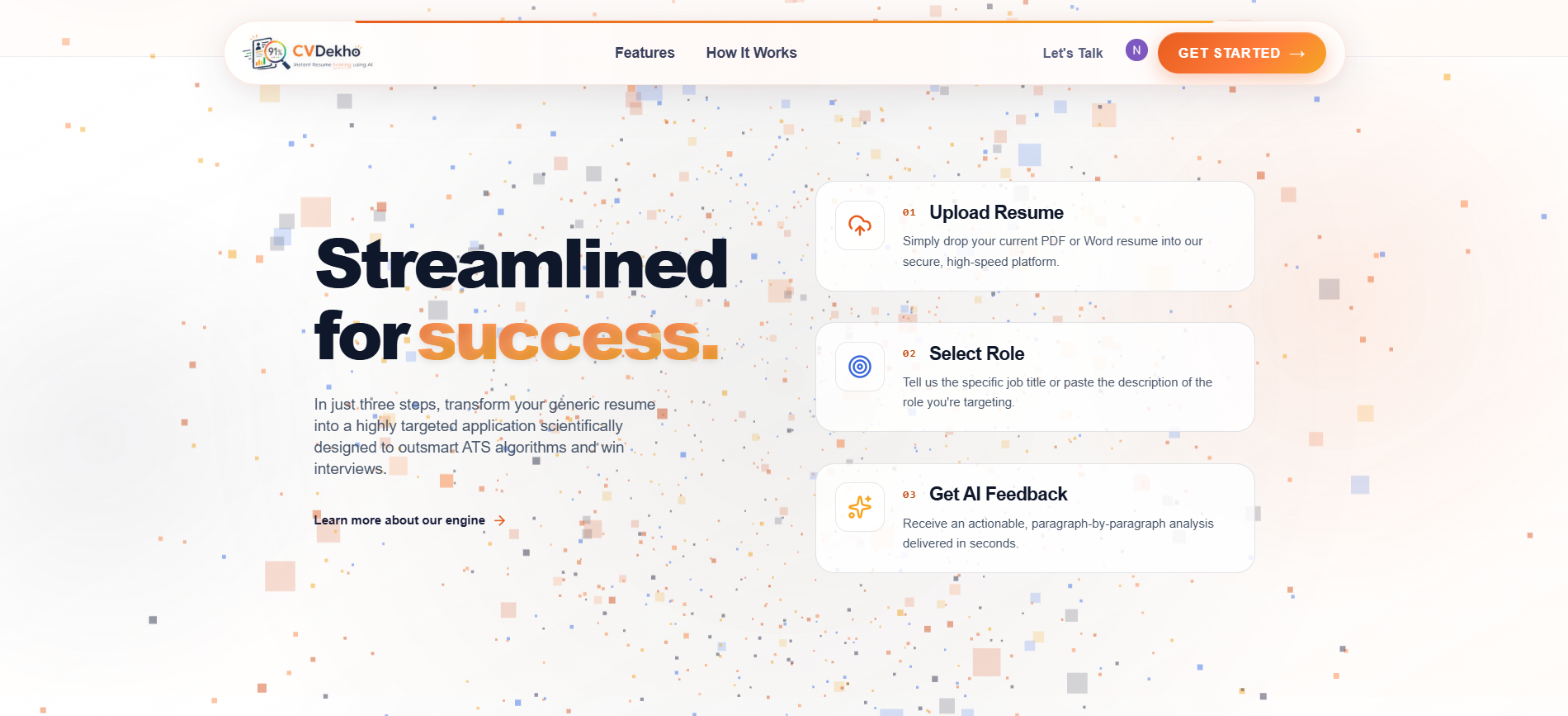
3-step flow — Upload Resume → Select Role → Get AI Feedback in seconds
The core intelligence of CVDekho is a carefully engineered prompt that instructs Gemini to evaluate each resume as a senior technical recruiter with 10+ years of experience and 50,000+ resumes reviewed. Scoring is calibrated to be honest — most student resumes score 35–55.
| # | Parameter | Weight | What Is Evaluated |
|---|---|---|---|
| 1 | Contact Information | 5% | Name, email, phone, LinkedIn, GitHub. Flags unprofessional email addresses. |
| 2 | Professional Summary | 10% | Existence, length (2–4 lines), role target, specificity vs. generic boilerplate. |
| 3 | Skills Section | 10% | Categorisation (Languages/Frameworks/Tools/DBs), realism, context, padding detection. |
| 4 | Projects & Experience | 20% | Action verbs, quantified achievements, impact statements vs. task descriptions. Highest weight. |
| 5 | ATS Keywords | 15% | Industry-standard keywords for apparent target role. Identifies up to 6 missing. |
| 6 | Education | 5% | CGPA listed, graduation year clear, relevant coursework. Low weight — qualifier, not differentiator. |
| 7 | Formatting & Clarity | 10% | 6-second scanability, consistent structure, white space, section header clarity. |
| 8 | Resume Length | 5% | Fresher: 1 page ideal, 1.5 max. Penalises <300 words or >2 full pages. |
| 9 | Achievements vs Responsibilities | 10% | Ratio of achievement bullets vs. task descriptions. Target: 60%+ achievement-oriented. |
| 10 | Overall Professional Impression | 10% | Grammar, tense consistency, polish, 6-second recruiter shortlist test. |
Why these weights? Experience & Projects carries the highest weight (20%) because for students and early professionals, what you've built is the only differentiator. Education carries only 5% — everyone has a B.Tech. ATS Keywords is second (15%) because a resume never seen by a human cannot be shortlisted.
| Grade | Score Range | Status | Implication |
|---|---|---|---|
| A | 85 – 100 | Excellent | Recruiter will very likely shortlist |
| B | 70 – 84 | Good | Strong candidate with minor gaps |
| C | 55 – 69 | Average | Will be filtered by ATS or HR |
| D | 40 – 54 | Below Average | Significant rework required |
| F | 0 – 39 | Critical | Complete restructure needed |
{
  "submission_id": "uuid-here",
  "overall_score": 47,
  "grade": "D",
  "overall_verdict": "Resume shows potential but lacks quantified achievements and ATS optimisation. Projects section is strong but described as task lists rather than impact statements.",
  "parameters": [
    {
      "name": "Projects & Experience",
      "score": 9,
      "max_score": 20,
      "status": "needs_improvement",
      "feedback": "Projects described as task lists. Add metrics: '...reducing load time by 40%' not '...worked on performance'."
    }
  ],
  "top_3_critical_issues": [
    "No quantified achievements in any project description",
    "Professional summary is generic boilerplate with no role target",
    "Missing 4 critical ATS keywords for software engineering roles"
  ],
  "ats_keywords_missing": ["REST API", "CI/CD", "Docker", "system design"],
  "rewritten_sections": {
    "professional_summary": "Final-year ECE student at HIT with hands-on experience building ML-powered web applications. Seeking software engineering roles where I can apply my FastAPI and Python backend skills.",
    "improved_bullet": "Built AI resume scorer using Google Gemini 2.5 Flash, reducing manual feedback time by 100% for 50+ test users across 14-day sprint."
  }
}Base URL: https://cvdekho-api.onrender.com
Interactive docs: https://cvdekho-api.onrender.com/docs
Accepts a PDF resume, runs the full pipeline, returns a structured scored result.
Request — multipart/form-data
| Field | Type | Required | Notes |
|---|---|---|---|
file |
File (PDF) | Yes | Max 5 MB, must start with %PDF magic bytes |
user_email |
string | No | Stored for result retrieval via submission ID |
Error Codes
| Code | Error Key | Trigger |
|---|---|---|
| 400 | INVALID_FILE_TYPE |
Not a PDF or MIME mismatch |
| 400 | FILE_TOO_LARGE |
Exceeds 5 MB |
| 400 | EMPTY_FILE |
Zero bytes |
| 400 | IMAGE_FILE_UPLOADED |
Image file uploaded instead of PDF |
| 422 | TEXT_EXTRACTION_FAILED |
Scanned/image PDF — text < 100 chars |
| 500 | AI_API_ERROR |
Gemini call failed or timed out |
| 500 | INVALID_JSON_FROM_AI |
Gemini response unparseable as JSON |
| 500 | DB_INSERT_FAILED |
Supabase INSERT failed |
Retrieve a previously analysed result by UUID. Returns 200 with same structure as POST, or 404 if not found.
Deployment health check.
{ "status": "ok", "service": "resume-scorer-api" }Table: resume_submissions (Supabase PostgreSQL)
| Column | Type | Description |
|---|---|---|
id |
UUID (PK) | gen_random_uuid() — auto-generated |
created_at |
TIMESTAMPTZ | DEFAULT now() |
user_email |
TEXT (nullable) | Optional — for result retrieval |
file_url |
TEXT (NOT NULL) | Supabase Storage URL of uploaded PDF |
extracted_text_preview |
TEXT | First 500 chars of CV text — for audit |
overall_score |
INTEGER (0–100) | Weighted final score from Gemini |
grade |
TEXT | A / B / C / D / F |
full_result_json |
JSONB | Complete Gemini response |
gemini_model_used |
TEXT | DEFAULT 'gemini-2.5-flash' |
processing_time_ms |
INTEGER | End-to-end pipeline time in ms |
AI-Resume-Scorer-and-Improvement-Advisor/
├── backend/
│   ├── app/
│   │   ├── main.py                  # FastAPI entry point — CORS config, router registration
│   │   ├── config.py                # Env var loading — API keys, size limits, bucket name
│   │   ├── api/
│   │   │   ├── routes.py            # POST /api/analyze-resume — 9-step pipeline
│   │   │   └── health.py            # GET /health — deployment monitoring
│   │   ├── services/
│   │   │   ├── gemini_service.py    # Gemini API call, JSON extraction, schema validation, retry
│   │   │   ├── pdf_service.py       # PyMuPDF extraction, page join, quality check
│   │   │   └── supabase_service.py  # upload_pdf, insert_record, update_result
│   │   └── utils/
│   │       ├── prompt_builder.py    # build_prompt() — CV text injected into 10-parameter schema
│   │       └── validators.py        # validate_pdf() — MIME, magic bytes, size, empty file
│   ├── requirements.txt
│   └── .env.example
├── frontend/
│   ├── app/                         # Next.js 14 App Router
│   ├── components/                  # Score gauge, parameter cards, keyword chips
│   ├── public/
│   └── .env.local.example
├── docs/
│   ├── CVDekho_Research_Document.docx
│   └── CVDekho_Project_Scope.docx
├── Company Logo.jpeg
└── README.md
- Python 3.12+
- Node.js 18+
- A free Supabase account
- A free Google AI Studio API key (no credit card required)
git clone https://github.com/navneet-nitin/AI-Resume-Scorer-and-Improvement-Advisor.git
cd AI-Resume-Scorer-and-Improvement-Advisorcd backend
python -m venv venv
source venv/bin/activate # Windows: venv\Scripts\activate
pip install -r requirements.txt
cp .env.example .env # Fill in your keys (see Environment Variables below)
uvicorn app.main:app --reload --port 8000Backend is now running at http://localhost:8000. Swagger docs at http://localhost:8000/docs.
cd frontend
npm install
cp .env.local.example .env.local   # Set NEXT_PUBLIC_API_URL=http://localhost:8000
npm run dev
Frontend is now running at http://localhost:3000.
Create the resume_submissions table in your Supabase project using this SQL:
CREATE TABLE resume_submissions (
  id UUID PRIMARY KEY DEFAULT gen_random_uuid(),
  created_at TIMESTAMPTZ DEFAULT now(),
  user_email TEXT,
  file_url TEXT NOT NULL,
  extracted_text_preview TEXT,
  overall_score INTEGER,
  grade TEXT,
  full_result_json JSONB,
  gemini_model_used TEXT DEFAULT 'gemini-2.5-flash',
  processing_time_ms INTEGER
);
Create a private storage bucket named resumes in Supabase Storage.
Backend (.env)
| Variable | Description | Where to get it |
|---|---|---|
GEMINI_API_KEY |
Google Gemini API key | aistudio.google.com — free, no credit card |
SUPABASE_URL |
Supabase project URL | Supabase dashboard → Settings → API |
SUPABASE_SERVICE_ROLE_KEY |
Service role key (not anon) | Supabase dashboard → Settings → API |
SUPABASE_BUCKET_NAME |
Storage bucket name | Set to resumes |
MAX_PDF_SIZE_MB |
Maximum upload size | Set to 5 |
ALLOWED_ORIGINS |
CORS allowed origins | Your Vercel frontend URL (or http://localhost:3000 for dev) |
Frontend (.env.local)
| Variable | Description |
|---|---|
NEXT_PUBLIC_API_URL |
Backend API base URL (Render URL in production) |
NEXT_PUBLIC_CLERK_PUBLISHABLE_KEY |
Clerk publishable key |
CLERK_SECRET_KEY |
Clerk secret key |
- Push backend code to GitHub
- Create new Web Service on Render.com (free tier)
- Set Build Command:
pip install -r requirements.txt - Set Start Command:
uvicorn app.main:app --host 0.0.0.0 --port $PORT - Add all environment variables in the Render dashboard
- Deploy — Render auto-deploys on every push to
main
- Connect your GitHub repository to Vercel
- Set Root Directory to
frontend - Add all
NEXT_PUBLIC_*and Clerk environment variables in Vercel dashboard - Set
NEXT_PUBLIC_API_URLto your Render backend URL - Deploy — Vercel auto-deploys on every push to
main
- Create
resume_submissionstable in Supabase - Create private
resumesbucket in Supabase Storage - Get Gemini API key from AI Studio
- Deploy backend to Render with all env vars set
- Deploy frontend to Vercel with backend URL configured
- Test full end-to-end: upload PDF → verify score → check Supabase record created
- Add privacy policy page (required for Google AdSense)
- Test on mobile — upload form and results must be fully responsive
Built under the HIT AI Systems & Industry Readiness Programme 2026, Haldia Institute of Technology.
| Member | Role | Key Responsibilities |
|---|---|---|
| Navneet | Product Lead + Prompt Engineer | Gemini prompt design, 10-parameter scoring system, AI integration, demo strategy |
| Nitin | Tech Lead + Integration Lead | Repo setup, frontend UI lead, end-to-end integration, deployment |
| Ishit | Backend Lead | FastAPI architecture, API design, backend logic, DB consultation |
| Khushi | PDF Extraction Specialist | PyMuPDF pipeline, scanned PDF rejection, text extraction |
| Neha | Database Engineer | Supabase schema design, PostgreSQL setup, storage bucket config |
| Nishant | Frontend Developer | Frontend UI design and implementation |
| Mayank | Result UI Lead | Score gauge, parameter breakdown, results dashboard visualisation |
| Manish | Result UI Support | Result page components, UI polish |
| Nabanita | Demo Lead | Pitch narrative, demo preparation, hackathon presentation |
| Juthika | Demo Support | Demo support, slide preparation, viva prep |
| Task | Responsible | Accountable | Consulted | Informed |
|---|---|---|---|---|
| Repo + Branch Setup | Nitin, Navneet | Nitin | Ishit | All |
| Backend API Setup | Ishit | Ishit | Navneet | All |
| PDF Extraction | Khushi | Khushi | Ishit | All |
| Database Setup | Neha | Neha | Ishit | All |
| Gemini Integration | Ishit, Navneet | Navneet | Nitin | All |
| Prompt Engineering | Navneet | Navneet | Ishit | All |
| Frontend UI Design | Nitin, Nishant | Nitin | Mayank | All |
| Result Page UI | Mayank, Manish | Mayank | Nitin | All |
| Testing & Debugging | All | Nitin | Ishit, Navneet | All |
| Integration (E2E) | Nitin | Nitin | Ishit, Navneet | All |
| Demo & Pitch Prep | Nabanita, Juthika | Nabanita | Navneet | All |
| Version | Timeline | Features |
|---|---|---|
| v1.0 | Hackathon Day | Fully deployed MVP — upload → score → suggestions → rewrites |
| v1.1 | Week 3–4 | UI polish, mobile improvements, score gauge animations |
| v1.2 | Month 2 | User auth (Supabase Auth), resume history, freemium scan limits |
| v2.0 | Month 3–4 | Job description matching — paste JD, get tailored keyword gap report |
| v2.1 | Month 4–5 | AI resume builder — full improved resume generated from feedback |
| v3.0 | Month 6+ | B2B API for placement cells, recruitment agencies, white-label |
| Concern | Policy |
|---|---|
| Storage access | Supabase Storage bucket is private — no public URL access, service role key only |
| Human review | No human reads uploaded CVs — only the AI pipeline processes text |
| Data sharing | CV data is never sold, shared, or used to train models |
| Legal basis | India DPDPA 2023 — users are informed via consent notice before upload |
| Deletion | Request deletion via GitHub Issues with your submission ID |
Contributions are welcome. Please follow the Git Flow branching strategy used by the team:
- Fork the repository
- Create your feature branch:
git checkout -b feature/your-feature-name - Commit using conventional format:
feat: add X/fix: resolve Y - Push to your fork:
git push origin feature/your-feature-name - Open a Pull Request targeting
develop— notmain
No direct commits to main. All PRs require at least one review before merge.
This project is licensed under the MIT License. See LICENSE for details.
Built with ❤️ by Group 37 · HIT AI Systems & Industry Readiness Programme 2026
Haldia Institute of Technology · Haldia, West Bengal